🔐Create FHEVM Example CLI

The fastest way to bootstrap privacy-preserving dApps on FHEVM

circle-check

⚡ Quick Start

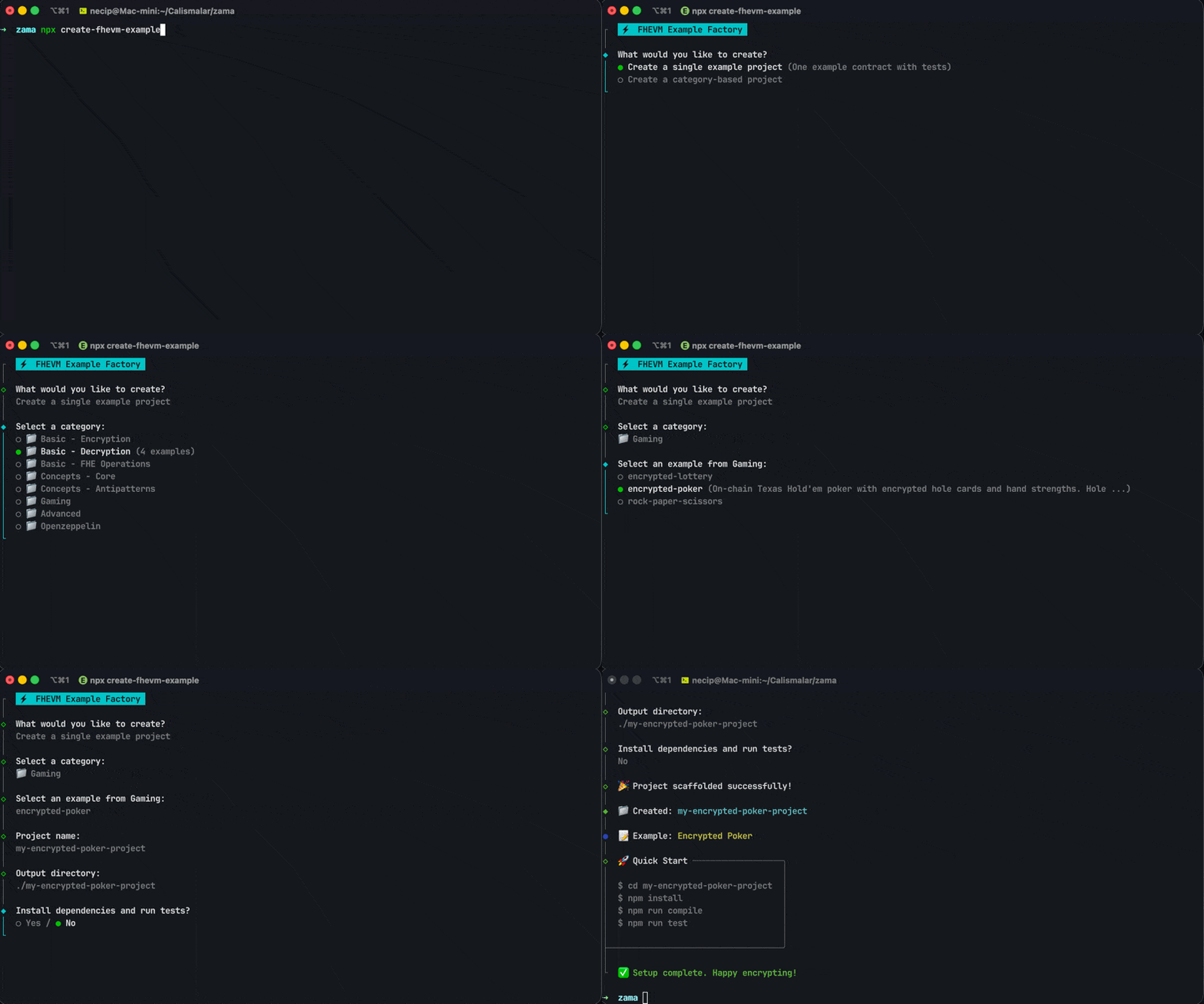
Get started in under 30 seconds with our interactive wizard:

npx create-fhevm-example
🎬 Watch the CLI in action — scaffold a project in seconds!

🎯 What You Get

⚡ Zero Configuration

Pre-configured hardhat.config.ts, FHE keys, network settings, and environment variables. Just run and build.

📚 33+ Ready Examples

From "Hello World" counters to advanced blind auctions and confidential tokens. Each with full test coverage.

🔌 Plug & Play

Create new projects OR inject FHE capabilities into your existing Hardhat projects with --add mode.


🎮 Three Powerful Modes

Choose the workflow that fits your needs:

1️⃣ Single Example Mode

circle-info

Perfect for: Learning a specific FHE concept step-by-step.

chevron-right📋 What gets created?hashtag

A minimal, focused project with just one example:


2️⃣ Category Bundle Mode

circle-info

Perfect for: Exploring a domain like Gaming, OpenZeppelin, or Advanced patterns.

Available Categories:

Category
Examples
Description

🎓 Basic

11

Fundamentals: counters, encryption, decryption

💡 Concepts

8

Access control, handles, input proofs, edge cases, anti-patterns

🎮 Gaming

4

Poker, lottery, rock-paper-scissors, blackjack

🏛️ OpenZeppelin

5

ERC7984, wrappers, swaps, vesting

🎯 Advanced

6

Blind auction, escrow, voting, KYC, payroll, order book


3️⃣ Smart Injection Mode (--add)

circle-exclamation

Already have a project? Upgrade it to FHE in one command:

What happens:

  1. ✅ Detects your Hardhat configuration

  2. ✅ Adds @fhevm/solidity and @fhevm/hardhat-plugin

  3. ✅ Updates hardhat.config.ts with FHE imports

  4. ✅ Injects a sample contract and test of your choice

🔧 Adding FHE to an existing Hardhat project

⌨️ CLI Options

Option
Description

--example <name>

Create a single example project

--category <name>

Create a category project

--add

Add FHEVM to existing Hardhat project

--target <dir>

Target directory for --add mode

--output <dir>

Output directory

--help

Show help message


🏗️ Project Structure

Every scaffolded project follows this clean, minimal structure:


🎬 Next Steps

After scaffolding, get your project running:

1

Install Dependencies

2

Compile Contracts

3

Run Tests

4

Start Building! 🚀

Open contracts/ and start writing your privacy-preserving logic!


❓ Frequently Asked Questions

chevron-rightDoes this work with existing Hardhat projects?hashtag

Yes! Use the --add flag inside your project directory. The CLI will detect your Hardhat setup and inject FHE dependencies automatically.

chevron-rightDo I need to install anything globally?hashtag

No! Just use npx (comes with Node.js). The CLI runs directly without any global installation.

chevron-rightWhat Node.js version is required?hashtag

Node.js v20.0.0 or higher is required. We recommend using the latest LTS version.

chevron-rightCan I use this offline?hashtag

Yes! All example files are bundled in the package. Scaffolding works fully offline — only npm install requires internet to download dependencies.

chevron-rightHow do I run tests after scaffolding?hashtag

Simply run these commands in your new project:

chevron-rightWhat networks are supported?hashtag

Projects are pre-configured for:

  • Local (Hardhat Network with FHEVM mock)

  • Zama Devnet (Sepolia-based testnet)

You can add more networks in hardhat.config.ts.


📚 Learn More

📖 FHEVM Documentation

Deep dive into Fully Homomorphic Encryption on the blockchain. docs.zama.org/protocol/arrow-up-right

💻 GitHub Repository

Star us, report issues, or contribute! github.com/NecipAkgz/fhevm-example-factoryarrow-up-right

circle-info

Need Help? Join the Zama Discordarrow-up-right community for support and discussions!

Last updated